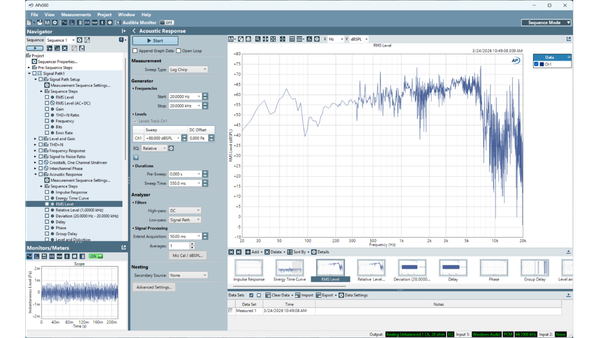
All APx515 instruments use the same APx500 measurement software. However, some features require that the software options SW-HST, SW-AML, or SW-ACR be installed on the analyzer. Therefore, not every download displayed here will work with every APx515.
Trace colors, saved data, crosstalk sweeps, quasi-peak noise, more.
Free upgrade for all APx users or download and run in demo mode.
Resources for API developers. Includes VB.NET and C# templates and example code, C++ examples, Intro to API Programming, API documentation (API Browser), and LabVIEW driver and documentation.
Audio Precision has developed a full-featured LabVIEW Driver for its family of APx500 Audio Analyzers. The APx LabVIEW Driver is a collection of Virtual Instruments (VIs) aimed at providing LabVIEW users the ability to access most of the functionality available in the APx500 Application Programming Interface (API) using high level, LabVIEW-typical subVIs, with a minimum number of programming steps. Using the Driver collection, LabVIEW users will be able to quickly and efficiently develop APx applications with clean, concise LabVIEW code. Please note that the LabVIEW Driver is version specific for each release of APx500.
No files in this category
The APx515 is a high performance audio analyzer optimized for production test. It is a best-in-class instrument for its speed, performance, automation, and ease-of-use.
Available translations
No files in this category
IronPython is a version of Python that can interface with .NET Assemblies. This download includes an APx Project and a Python code sample that controls APx500 via the APx API.
This installer provides the APx500 Help files translated into Chinese. The files are placed on the Windows Desktop; if APx500 is installed, the files are also installed with the program files for complete Help functionality. Windows XP users may have to download Chinese fonts from Microsoft for proper display.
Available translations
APx500 measurement software for all APx Series instruments.
This download is suitable for most users. If Microsoft .NET version 4.0 is not already on your PC, it will be downloaded during the installation.
For PCs that do not have .NET version 4.0 installed, and are not connected to the Internet, download the full installer instead (APx500 Measurement Software (with .NET)).
APx500 Measurement Software for all APx Series instruments.
This download includes the Microsoft .NET Framework version 4.0, and is suitable for installation on PCs that are not connected to the Internet and do not already have version 4.0 installed.
For installation on Internet connected PCs, download "APx500 Measurement Software" instead.
Describes new features in the latest release of the APx500 measurement software.
Set of MATLAB functions for audio applications such as reading and writing waveforms and filters for 2700, ATS-2, and APx
Describes using LabVIEW with APx in a lab or automated production environment. Examples using the APx LabVIEW virtual instrument driver are shown.
A look at some of the important features needed in an acoustic audio analyzer, the problems you may encounter in non-ideal testing environment, the needs of good production line testing, and the range of measurements and results that should be produced.
Available translations
Cost benefit analysis of high performance, low price audio test equipment in production.
Technote 104 discusses methods of making a set of basic measurements using an Audio Precision 2700 Series or ATS-2 audio analyzer.These are Level Frequency Response THD+N Phase Crosstalk Signal-to-Noise Ratio
Available translations
In this technote, we discuss how to test the analog sound quality of FM radio receivers using an Audio Precision APx500 Series audio analyzer. We also discuss how to test the Radio Data System (RDS), which allows text, such as song title and artist, to be transmitted digitally as part of the analog radio signal.
Available translations
In this technote we describe and compare two different methods to measure PSRR. Then we give instructions for using the APx PSRR Measurement Utility, which simplifies the calculations and graphing on APx analyzers.
This technote is included in the APx PSRR Measurement Utility download.
Available translations
Describes how to measure the sound pressure level developed by portable audio players and their associated headphones, according to British Standard / European Norm 50332. Also shown is how to use the APx Portable Audio Player / Portable Headphone Test Utility to facilitate making the necessary measurements with an APx500 analyzer.
Performing the tests described in this Technote requires that you download the APx Portable Audio Player / Headphone Test Utility, which includes the Windows installer, VB.NET source code, and this Technote.
This Technote discusses the techniques necessary to perform the “Basic Six” audio measurements on consumer-level PC audio devices. This category includes sound systems integrated into notebooks, netbooks, tablets, and PC motherboards, as well as expansion cards and some external devices. It doesn’t include USB-connected headsets, nor pro-audio devices with balanced input and output connections.
Includes APx project and .wav test signal files for playback
Addresses conversion of tests and procedures written using AP’s DOS S1.EXE software for System One to APx500. If you are using AP’s Windows based APWin, AP2700, or ATS software with one of our legacy products, please refer to Technote 110 instead.
Addresses conversion of tests and procedures/macros written using AP’s Windows based APWin, AP2700, or ATS software to APx500. If you are using AP’s DOS based S1.EXE software for System One, please refer to Technote 109 instead.
This Technote discusses techniques for testing the audio performance of USB headsets using an Audio Precision APx analyzer. Includes APx projects and wave files.
This Technote and its associated APx projects and waveforms allow confidence testing of computer audio systems for compliance with the Microsoft Windows Logo program in a rapid and efficient manner.
Acoustic sounds or noise in the environment is typically measured with a handheld sound level meter. This Technote explains some of the theory behind such measurements, and how to make them instead using an APx analyzer. Using the analyzer adds the capability to perform spectrum analysis, and to visualize the character of the sound signal over time. The latter is especially valuable when measuring non-steady state sounds, such as a pulsating alarm. Requires the APx Sound Level Meter Utility, available as a separate download, to make the measurements.
Describes how to test microphone preamplifier phantom power, with and without simultaneous audio. You may instead download the "APx Phantom Power Measurement Project," which runs the tests (that download also includes this Technote).
Making noise measurements of microphone preamplifiers (and other high-gain circuits) involves special techniques that differ from those used to measure low-gain devices. This technote explains the theory as well as how to make these measurements.
APx FM MPX-RDS Waveforms 50µs (except North America) contains a series of FM multiplex and RDS encoded waveforms for FM radio receiver testing with the APx Series analyzers. The test streams are versions of the stereo .wav files that can be created with the Audio Precision Waveform Generator Utility (WfmGeneration.exe), also available for download.
Copy the folder to your PC and load the desired file using the generator waveform browser inside the APx500 application. Download Technote 105: FM Radio Receiver Testing with APx Audio Analyzers for a discussion on FM testing.
APx FM MPX-RDS Waveforms 75µs (North America) contains a series of FM multiplex and RDS encoded waveforms for FM radio receiver testing with the APx Series analyzers. The test streams are versions of the stereo .wav files that can be created with the Audio Precision Waveform Generator Utility (WfmGeneration.exe), also available for download.
Copy the folder to your PC and load the desired file using the generator waveform browser inside the APx500 application. Download Technote 105: FM Radio Receiver Testing with APx Audio Analyzers for a discussion on FM testing.
A set of nine test signals in mp4 video file format for open loop smartphone testing on APx Series analyzers. Includes multitone signal definition file in csv format.
The full track listings for all APx test signal discs – APx-BD1, APx-DVD1, and APx-CD1. These discs may be ordered from Audio Precision.
Alternately, the linear test signals may be created using the APx Waveform Generator Utility (available as a download), and the Dolby and dts encoded versions may be downloaded as "APx Dolby Generator Waveforms" and "APx dts Generator Waveforms" respectively.
User manual for APx500 measurement software. Includes detail on signal path setup, hardware connectivity, and software features for all APx models: APx515, 520, 521, 525, 526, 585, and 586.
Available translations
A barcode scanner may be useful in production testing, not only to expedite data entry, but to eliminate the possibility of initiating the wrong test routine. The APx Barcode Scanner Interface is a small VB.net application (Run_Barcode_Project_ID.exe) that automatically loads an APx project who's name matches the barcode data.
For use with the APx Sound Level Meter Utility. See the associated KB article for full discussion and instructions.
The APx Damping Factor Measurement Utility plots audio amplifier damping factor vs. frequency. It is developed in LabVIEW 2009, but does not require that you have LabVIEW to run. See the accompanying knowledge base article for an explanation and instructions.
Includes the Windows installer, source code, and instructions.
The version number of this utility must match the version of the APx software that you are running.
A simple APx project file to demonstrate testing of FM transmitters and receivers, including automotive head units. Includes a set of MPX-RDS-encoded sweeps and tones.
These files can be used with APx500 v2.7 or later to create equalized sweeps or equalized multitones.
Included are RIAA, FM 50uS, and FM 75uS emphasis and de-emphasis curves.
Measures jitter at the receiving end of an AES3/SPDIF connection by using a special J-test stimulus signal and analyzing the analog output spectrum. Displays graphs showing the FFT spectrum, the jitter spectral density, and the integrated jitter, in addition to a total jitter value. Tools are included for manipulating the graphs, exporting data, and printing.
Download includes the utility, J-test stimulus waveforms, and instructions. The utility version must match the version of APx500 that you are running.
This project measures loudspeaker impedance using the constant voltage method, taking advantage of the derived measurements feature of APx v2.6 or greater.
Complete instructions and explanation are in the accompanying KB article.
An external sense resistor is required for this project. The "APx Loudspeaker Impedance Measurement Utility," also available for download, can utilize the built-in source resistor in APx analyzers.
This utility for APx analyzers allows you to make an impedance vs frequency sweep across a loudspeaker, and then see the graph and data results directly in ohms. Clicking Help in the utility will display the complete instructions, including a discussion of the theory behind it. This download includes the compiled utility application (LabVIEW not required to run), as well as the LabVIEW 2009 source code.
This utility can utilize the built-in source resistor on APx analyzers to make impedance measurements. The "APx Loudspeaker Impedance Measurement Project," also available for download, requires an external sense resistor. It uses the constant voltage method and takes advantage of the derived measurements feature of APx500 v2.6 and later.
APx mixing console sample project with instructions. Requires any APx instrument.
The output impedance of a device can easily be calculated by measuring its output voltage with and without a known load attached. The APx Output Impedance Measurement Utility simplifies the procedure by calculating and graphing the results. It is developed in LabVIEW 2009, but does not require that you have LabVIEW to run. See the accompanying knowledge base article for an explanation and instructions.
The version number of this utility must match the version of the APx software that you are running. Includes the Windows installer, source code, and instructions.
Allows measurement of phantom power on a microphone preamplifier, with and without a simultaneous audio signal. Requires a special Phantom Power Test Fixture, described in Technote 114: Measuring Phantom Power (included).
Tests portable audio players and headphones packaged as a set, and as individual components, for compliance with the BS EN 50332 standard. Works with any APx Series analyzer. The version of APx500 software must match the utility version. Includes the Windows installer, VB.NET source code, and Technote 107 with full instructions.
APx power amplifier (linear) sample project and instructions. Requires any APx instrument.
The files created while doing "Tutorial A: Making a Custom layout from the Default layout" in the APx500 program Help. Use these files if you wish to skip Tutorial A and proceed with Tutorials B and C.
This APx project and related files demonstrates how to run an external program from APx500. Includes THD+N measurement and Stepped Frequency Sweep measurements. The project file calls the Goldwave audio editor program, so you will either need to install Goldwave, or substitute another audio player with a command line interface. Accompanies the kb article "Running an external program from APx500," which gives a complete explanation.
Allows an APx500 Series Analyzer to measure acoustic noise or sound in the environment, taking the place of a handheld sound level meter. Using the analyzer adds the capability to perform spectrum analysis, and to visualize the character of the sound signal over time. The latter is especially valuable when measuring non-steady-state sounds, such as a pulsating alarm. Technote 113, included, describes the theory and how to use the utility.
The Waveform Generator Utility (WfmGeneration.exe) allows you to generate the 34 APx External Source signals at any of a wide range of sample rates and at two bit depths. It also allows you to generate 8 other waveforms. For more information on the 34 APx External Source signals, see the file "Audio Precision Test Signals on CD.pdf" in the Audio Test Signals folder.
This utility program was created to alleviate the need of copying and transferring gigabytes of linear PCM audio files for external source testing. You are free to copy this utility to other computers or media, where you can generate the audio files you may need for external source testing.
Discusses writing and reading good audio specifications. Guidelines are provided, then key specifications for two classes of audio device are examined for correct expression and form, with examples of real-world specs for comparison.
Transmitting and storing audio signals in the digital domain is well-established in the broadcast industry. Analog audio has given way to the AES3 and Sony/Philips Digital Interface Format (SPDIF). AES3 data streams are also embedded in SDI television signals. Handling audio in the digital do- main offers many advantages over analog methods. An analog signal incurs progressive degradation as it passes through a chain of circuits. Converting the analog signal into digital and converting back to analog as late in the chain as possible overcomes this degradation.
Measuring Distortion in Switching Amplifiers by Bruce Hofer
Switch-mode audio power amplifiers are becoming increasingly popular due to their smaller size, lower weight, and improved efficiency. Their advantages are obvious in low power battery operated personal audio players and laptop computers. However they are also progressively displacing more traditional linear designs in mainstream applications such as home entertainment systems, automotive sound systems, and professional installations where high quality audio is important. Measuring the performance of switch-mode amplifiers presents some new and unique challenges. They inherently generate ultra-sonic artifacts and spurious signals with slew rates that can provoke non-linear behavior within the input stages of high quality audio test and measurement equipment. Absolutely worthless and inaccurate results can result unless effective measures are taken to prevent this non-linear behavior. Written by Bruce Hofer.
Available translations
The Personal Computer audio environment has evolved over the years to become a significant entity within the field of acquisition and rendering of audio information. The personal computer is a highly sophisticated interactive environment that is much more complex than a conventional dedicated home audio device, leading to new problem areas. These include, but are not limited to, stochastic interrupts, network accesses, disc I/O and disparate hardware qualities. While the environment of a highly matrixed multi-tasking concurrent operating system offers many opportunities to overcome quality issues, the PC, due to the media-rich tools and feature sets, is becoming the entertainment capture and rendering device of choice for future generations. Presented at the 114th Convention, 2003 March 22–25 Amsterdam, The Netherlands. Wayne Jones, Michael Wolfe, Theodore C. Tanner Jr., Daniel Dinu
This reference handbook is a practical, hands-on guide for workers in all phases of the audio field. It covers basic tools and techniques, common environments for audio testing, application of these techniques to common audio devices, the typical ranges of performance to expect in different devices, and a glossary of terms and key specifications used in audio measurement. 178 pages Written by Bob Metzler.
Available translations